Where can I check my monthly document usage?
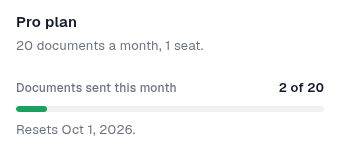
Check your organization’s Plan & billing card for the usage and reset date shown for your account.
Updated
Check your organization’s Plan & billing card for the usage and reset date shown for your account.
Steps#
- Open your organization.
- Find Plan & billing and check the displayed plan.
- When a usage meter is available, read Documents sent this month and the reset date.
- Ask support about a missing meter or unexpected limit; include the plan and error wording, not payment details.
Related: Sign in · Prepare a support request.
Screenshots#